



The Shadow DOM
For anyone who has worked on a large team to create a rich UI framework, the need for better encapsulation of the DOM is apparent. Style collisions and painful namespacing techniques lengthen development processes. Worse, the sometimes unavoidable need for complete encapsulation forces us to resort to the ugly and evil iframe.
A better form of client-side encapsulation is easing itself into your arsenal of tools. The Shadow DOM spec proposes to expose a technique that has been used by browser vendors for years – a method of associating a DOM subtree (or shadow DOM) with an element in your document – without actually bringing that subtree into the document itself.
What does this mean for you? The ability to create rich web components without the fear that a forgotten namespace or non-specific JavaScript selector will tamper with your widget. The Web Components spec, of which the Shadow DOM is a part, will extend these capabilities to allow custom elements with their own custom APIs. You can almost hear the programming best practices cheering in triumph.
The Shadow DOM can be explored by inspecting some of the HTML5 elements we use daily. Browser vendors create these more complicated UI elements with a little help from their friend, the Shadow DOM. Let’s take a look at the “range” input type. A simple inspection of an input range looks as follows:
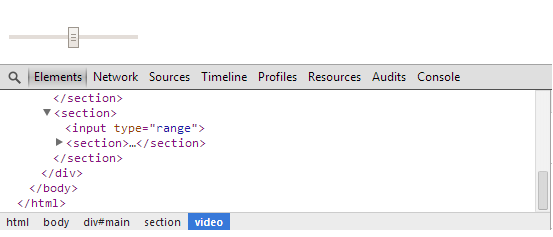
As we expected… we can view the input range element. However, with the use of the Chrome DevTools, we can view behind the scenes. If you enable the view of the Shadow DOM in your DevTools settings, your Web Inspector will display the Shadow DOM that is attached to this input range. The web inspector will then display:
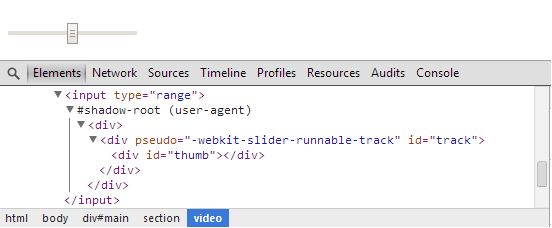
You can see the hidden Shadow DOM ( signified by the #shadow-root node ) that controls the track and thumb of the range slider. The use of the Shadow DOM here is important – it protects this commonly used input type from inadvertent style overrides and over-zealous JavaScript selectors. If there is another element on the page with an id of “thumb” our input is still safe. The range input type is completely encapsulated. Try inspecting an HTML5 video element and you will see the hidden elements that make up the play button, volume slider, etc. And when you utilize this technique in your own development your own rich UI widgets will be protected from the pages that include them.
Web Components are not yet widely available across browsers, but there is much to be played with in Google Chrome (especially in Chrome Canary). Some sophisticated polyfills are working to close the gaps. Google’s Polymer Project and Mozilla’s X-Tag Project provide excellent training ground to those who are interested.
What can we as Web Developers do? Generate some interest. Play around with a polyfill. Enable Shadow DOM viewing in your Web Inspector and get to know it. And share your enthusiasm with other developers. Perhaps we can propel this movement forward and convince the browser vendors who are not yet on board why they should be.