



Math Driven CSS
As recently as a few years ago front-end developers had to rely solely on images, JavaScript, or Flash when trying to build complex layout components and animations.
Fortunately things have changed. The W3C’s new standard was thankfully broadly adopted, leading to a big step in a front-end developer’s capabilities. Difficult problems we once faced can now be easily solved with CSS3 and related technologies like SASS.
One fascinating application of these concepts combines mathematics with CSS to produce regular geometric polygons out of HTML elements. Below is a quickstart guide to making the most of math driven CSS.
1. The CSS3 transform property.
The transform property applies a 2D or 3D transformation to an element. This property allows you to rotate, scale, move, skew, etc., elements.
The skew transformation is particularly interesting because we can use it to create regular polygons
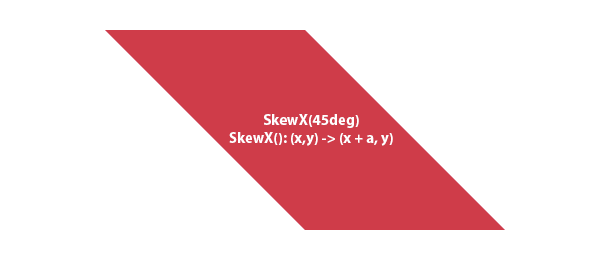
As we can see, just applying a skew transformation we can create something that is very close to a rhombus.
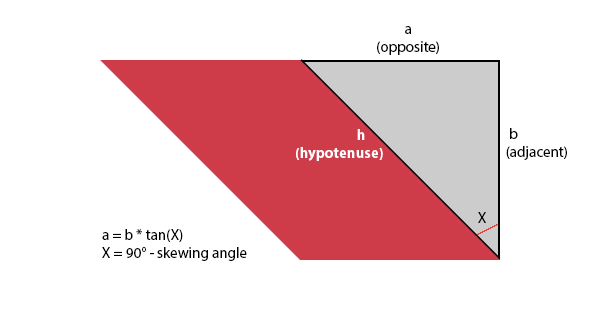
The resulted geometric figure is not yet a rhombus due to the difference between width & height. We can calculate this difference using trigonometric functions.
2. Trigonometric functions
We all know (or remember once learning) that we can use SIN / COS / TAN to calculate sides of a triangle
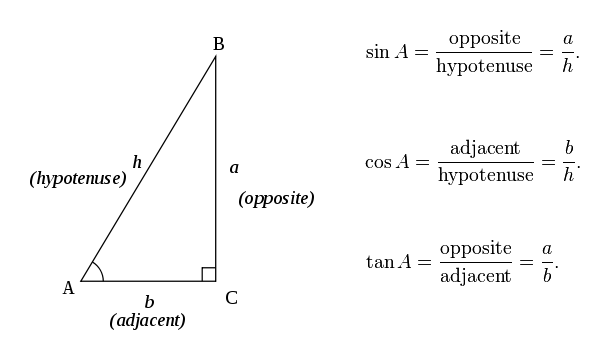
We can use the famous SOHCAHTOA formulas to calculate the difference between width & height from the previous step
3. SASS (or any other CSS preprocessor)
The final step in creating a regular polygon is combining the transform rule with trigonometric functions. Using a CSS preprocessor we can incorporate mathematical calculation in CSS .
So we if we go back to our unfinished polygon and apply the W/H difference we will end up with a proper rhombus looking like this:
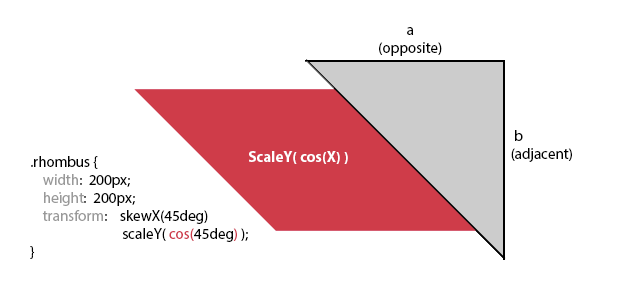
Please see this code for more details: http://codepen.io/Mihnutzen/pen/EvpwF
The rhombus we just created is the easiest geometric figure we can build. For building it we made use of skew() and scale(), but the transform property gives us a bunch of other actions that we can use to create other geometric figures. A triangle for example, is created by translating an inner container of the rhombus by 50%. A star can be made out of 3 rhombuses, each rotated in a different direction.
Based on the principles we just saw, we can build any geometric figure we can imagine. If you get the math right, SASS and Transforms will take care of the rest.
Here are a few example to help you get started:
- Triangle: http://codepen.io/Mihnutzen/pen/wzoIB
- Pentagon: http://codepen.io/Mihnutzen/pen/AFiwG
- Hexagon: http://codepen.io/Mihnutzen/pen/IbElh