


A Preliminary Review of Google Web Designer
Google announced the launch of their new Web Designer tool this past Monday, which they describe as a “professional-quality design tool.” I was intrigued to see what it could do and whether I was going to be out of work in a few weeks time.
First, let me correct an initial misconception – Web Designer is not really an “all-conquering” web design tool or IDE, but rather it is a tool for creating cross-platform Google Ads in HTML5. It could also be used to directly wrangle HTML, CSS and JavaScript files if you were so inclined, but that is not the focus of the tool.
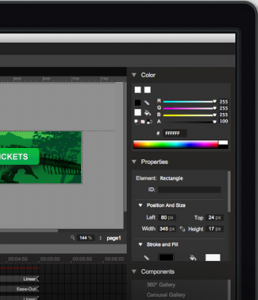
Web Designer is primarily a visual tool, and comes with all of the basic tools and functions that visual designers will be used to. It also ups the ante somewhat with a set of animation features that can leverage the power of 3D in CSS3, and a set of common components for galleries, carousels, videos and maps with emphasis on the Google ecosystem.
For developers more used to working in an IDE and a browser than a WYSYIWYG tool, Web Designer is probably something of a blast from the past. The overall feel recalls the old Macromedia-powered days of Dreamweaver, Flash, Director, and timeline animation but there is a fairly comprehensive “Code View” which enables the more hands-on (or obsessive) developer to fine-tune the JavaScript and CSS and quickly preview their creations in any browser they have installed.
Web Designer may not be the go-to tool for the more experienced, hands-on web developer but it could be useful as rapid prototyping tool to quickly mock interfaces and interaction demos in the browser without requiring expert development skills.
Whilst there are competitors out there in a similar space the fact that Web Designer is free will surely be attractive to more cost-conscious users. Its primary value, however, is likely to be its direct support for DoubleClick rich media ads and AdMob mobile ads. By using Web Designer it is possible to quickly create fully-realised digital ad creative in any of the common sizes and formats, packaged, ready for deployment, and accessible on any screen – desktop, tablet or mobile – without compatibility issues.